
AceLight
A lightweight open-source protocol
for devices on a CAN bus

Work in progress - last updated 16. November 2026.
Overview
AceLight is designed as a lightweight application-layer protocol. Built on top of the reliable and robust Controller Area network (CAN) transport layer it is designed to provide distributed embedded systems with a simple, deterministic, and easy-to-integrate and understand communication framework for parameter-based data exchange.
It is recommended to read and understand the standard CAN extended frame format before continuing...
The protocol is kept lightweight and low in complexity by the use of a simple CAN Identifier and transmission of self contained single CAN frames, as sent and received by nodes on the bus. Fragmentation and reconstruction of messages from multiple frames is not needed nor implemented in the protocol. Received frames are acknowledge with a response message containing a status code. Re-transmissions and timeout functionality is left for implementation in the specific application of the protocol.
Parameter-based communication
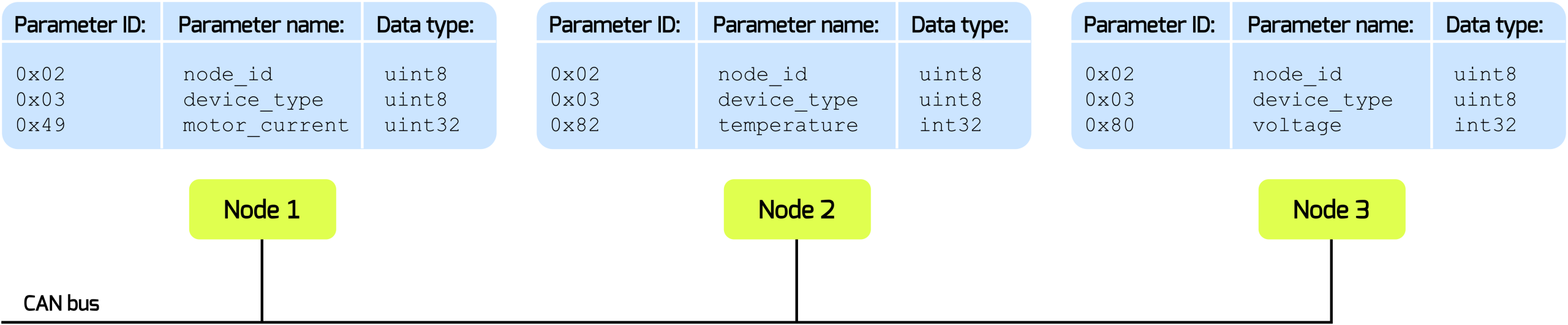
The backbone of the AceLight protocol is a parameter based system where data is read or written under a specific parameter ID. A node or module holds a table of parameters that can be accessed by other nodes on the CAN bus. The table is module specific and IDs and its content and data type must be known in advance for successful read/write communication. Parameter IDs and their data content and type should be documented in module specific data sheets etc.
Core Protocol
The protocol reduces communication to a simple request/response model with the addition of a broadcast message type. Broadcast messages are delivered to all nodes on the network and are intended for deterministic synchronization events, and high-priority node events such as fault notifications.
CAN Identifier
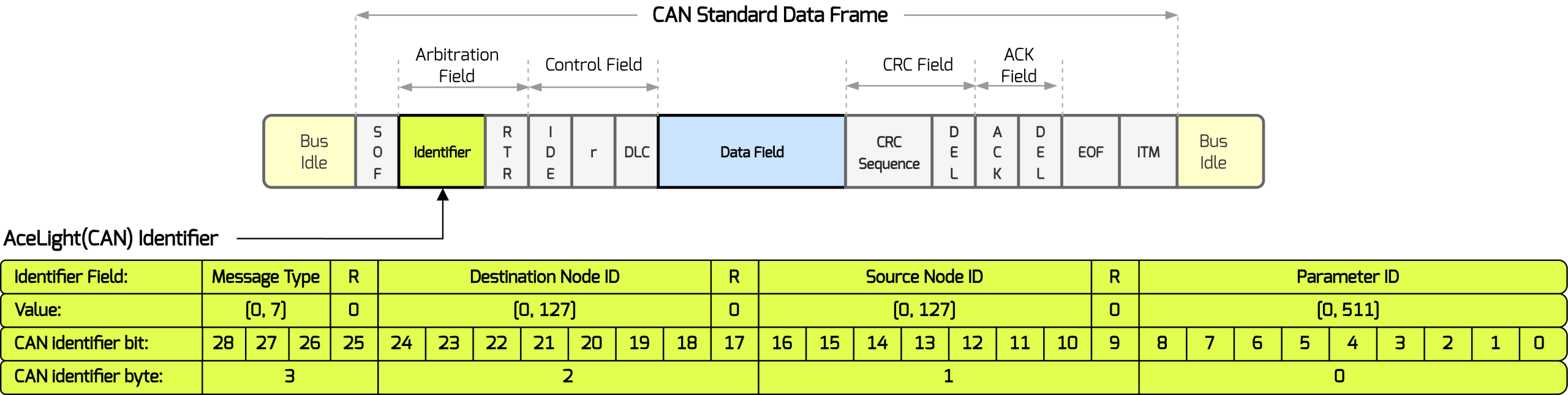
AceLight uses the 29-bit Identifier section of the extended CAN frame format to encode the protocol message type, Destination node ID, Source node ID and the Parameter ID. The CAN Data Field is used for transferring the actual data that lives under the parameter ID.
The following figure shows how AceLight build the CAN identifier.
Message types
The available protocol message types are described in the following together with the expected content of the CAN Data Field (data payload field). AceLight uses the standard data field length of 8-bytes per CAN frame. Support for CAN-FD with payload fields of up to 64 bytes is to be implemented and set as a future milestone.
The message type is encoded in the three most significant bits of the CAN identifier. CAN’s built-in arbitration gives lower numerical identifiers higher priority when multiple nodes attempt to transmit simultaneously. Consequently, lower-valued message types take priority over higher valued types, regardless of the destination, source or parameter ID. Priority determines access to the bus, but it does not interrupt a frame already being transmitted.
ACE_MSG_BROADCAST       = 0x01
ACE_MSG_WRITE_REQUEST   = 0x02
ACE_MSG_WRITE_RESPONSE  = 0x03
ACE_MSG_READ_REQUEST    = 0x04
ACE_MSG_READ_RESPONSE   = 0x05
0x01 = Broadcast
A broadcast message can have the CAN Data Field contain data related to the broadcast or it can be empty.
0x02 = Write Request
The Data Field contains the data to be written under a specific parameter ID for a specific Node.
0x03 = Write Response
The Data Field contains a status code located in the first byte. The remaining bytes are empty.
The status code gives information about how the previously received write request was handled.
0x04 = Read Request
For a read request message the Data Field should not contain any data.
0x05 = Read Response
For a read response the Data Field contains a status code in the first byte. The remaining bytes contains the data that lives under the specific parameter ID.
ACE_STATUS_OK                = 0x01
ACE_STATUS_DATA_FOLLOWS      = 0x02
ACE_STATUS_INVALID_PARAMETER = 0x03
ACE_STATUS_INVALID_VALUE     = 0x04
ACE_STATUS_READ_ONLY         = 0x05
ACE_STATUS_WRITE_ONLY        = 0x06
ACE_STATUS_NODE_BUSY         = 0x07
Request / Response
Read and write operations use a request/response exchange between two nodes. The requesting node identifies the destination and parameter in the CAN identifier. The destination replies using the corresponding response message type, retaining the parameter ID and swapping the source and destination addresses.
Each response includes a status byte indicating the result. A successful read returns ACE_STATUS_DATA_FOLLOWS (0x02) followed by the parameter value.
A successful write returns ACE_STATUS_OK (0x01)
Example reading sensor data
A host with node ID 1 reads the sensor temperature data from a Ranger Mk1 module with node ID 2. The temperature parameter has ID 0x082 and returns a signed 32-bit integer in millidegrees celsius.
| Field | Read request | Read response |
|---|---|---|
| Message type | 0x04 — Read request |
0x05 — Read response |
| Destination Node ID | 2 — Ranger Module |
1 — Host |
| Source Node ID | 1 — Host |
2 — Ranger Module |
| Parameter ID | 0x82 — Temperature |
0x82 — Temperature |
| CAN identifier | 0x10080482 |
0x14040882 |
| Data length | 0 Bytes |
5 (1 status + 4 payload) Bytes |
| Data payload | Empty | 02 40 E2 01 00 |
The example response contains status 0x02 (DATA_FOLLOWS) followed by the illustrative value 123456, encoded as a little-endian I32. Its units and scaling depend on the definition of parameter 0x82.
Example writing data to a parameter
The host sets motor_current (parameter 0x49) to 400 mA on Ranger node 2. The value is encoded as a U32 in milliamps.
| Field | Write request | Write response |
|---|---|---|
| Message type | 0x02 — Write request |
0x03 — Write response |
| Destination | 2 — Ranger Module |
1 — Host |
| Source | 1 — Host |
2 — Ranger Module |
| Parameter ID | 0x049 — Motor current |
0x049 — Motor current |
| CAN identifier | 0x08080449 |
0x0C040849 |
| Data length | 4 Bytes |
1 (1 status) Byte |
| Data payload | 90 01 00 00 |
01 |
The request contains 400, encoded as a little-endian U32. Ranger replies with status 0x01 (OK), confirming that the write was accepted.
Python library
A Python library for use of the acelight protocol together with the AceHigh Ranger Mk1 module is available from PyPI
under the package name acelight: https://pypi.org/project/acelight/
The package is currently released as a pre-release with ongoing development for a first full release scheduled for end of November 2026.

© 2026 AceHigh ApS EST. 2025 CVR: 46180860.
All rights in the known universe reserved.